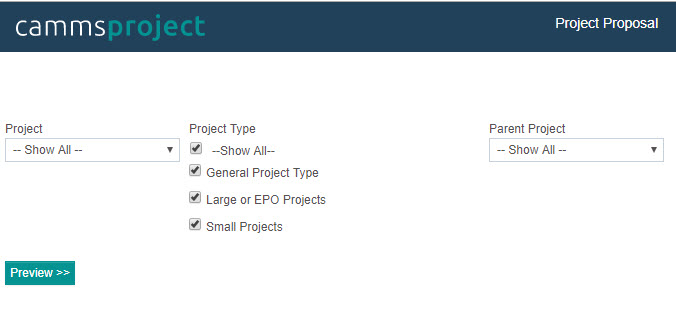
The project proposal report is designed to provide the users with the ability to extract Project business case, budget and assessment details of a project. The report includes all the data specified within the project proposal phase.
Report Filters:
|
Filter |
Description |
|
Project |
Dropdown allows selection of an existing Project. 'Show All' is selected by default |
| Project Type |
Multi- select check-box filter to select project types. 'Show All' is selected by default |
| Parent Project |
Dropdown list of all parent projects within the system. Allows you to select a parent project. 'Show All' is selected by default |
Report Body:
|
Report Body |
Report Element |
|
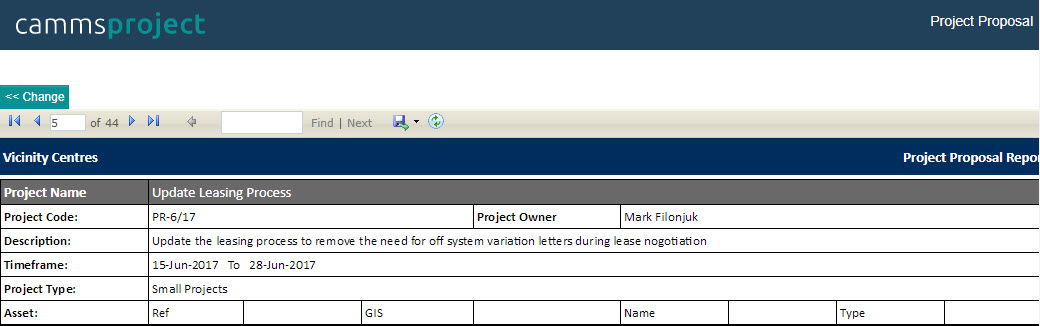
Project Name |
Displays the Project Title defined within Project Details area |
|
Project Code |
Displays the Project Reference number defined within Project Details area |
|
Project Owner |
Displays the name of the project owner defined within Project Details area |
|
Description |
Displays the project description defined within Project Details area |
|
Parent Project |
Displays the parent project name defined within Project Details area |
|
Time Frame |
Displays the Start and End Date of the project defined within Project Details area
|
|
Project Type |
Displays the Project Type defined within Project Details area |
|
Asset |
|
|
Ref |
Displays the reference number of the asset defined within Project Details area. (Asset reference number is defined within asset setup area) |
|
GIS |
Displays the GIS reference number of the asset defined within Project Details area. (GIS reference number is defined within asset setup area) |
|
Name |
Displays the Name of the asset defined within Project Details area. (Asset Name is defined within asset setup area)
|
|
Type |
Displays the Type of the asset defined within Project Details area. (Asset Type is defined within asset setup area) |
|
Business Case |
|
|
Business Case Field 1 |
Displays the value of Business Case Field 1 within Business Case object |
|
Business Case Field 2 |
Displays the value of Business Case Field 2 within Business Case object |
|
Business Case Field 3 |
Displays the value of Business Case Field 3 within Business Case object |
|
Business Case Field 4 |
Displays the value of Business Case Field 4 within Business Case object |
|
Note: Business Case Field names can be configured from the object editor of the business case object in the workflow configuration area |
|
|
Preliminary Budget - Displays all budget details within Preliminary Budget object |
|
|
Business Case Objectives |
|
|
Objective Name |
Displays the Objective Name defined within Business Case Project Objective section of Business Case object |
|
Objective Details |
Displays the Objective Description defined within Business Case Project Objective section of Business Case object |
|
Objective Met By |
Displays the Objective Met By defined within Business Case Project Objective section of Business Case object |
|
Project Delivery Option |
|
|
Option Name |
Displays the Option Name defined within Business Case Project Delivery Options section of Business Case object |
|
Description |
Displays the Option Description defined within Business Case Project Delivery Options section of Business Case object |
|
Advantages |
Displays the Option Advantages defined within Business Case Project Delivery Options section of Business Case object |
|
Disadvantages |
Displays the Option Disadvantages defined within Business Case Project Delivery Options section of Business Case object |
|
Project Outputs |
|
|
Name |
Displays the Project Name defined within Project Outputs object |
|
Description |
Displays the Project Name defined within Project Outputs object |
|
Approval Status |
Displays the project approval status. |
|
Project Strategies |
|
|
Primary Strategy |
Displays the primary strategy defined within Project Linkage object |
|
Secondary Strategies |
Displays the secondary strategies defined within Project Linkage object |
|
Funding Partners - Displays the details of the funding partners defined within Project Link Funding Partner area of Project Linkage object |
|
|
Assessment |
|
|
Name |
Displays the assessment element name. defined within Assessment Model object |
|
Assessment Score |
Displays the final assessment score within Assessment Model object |
|
Assessment Status |
Displays the assessment status within Assessment Model object. That is whether the assessment is Approved or Not Approved |
|
Date |
Displays the last modified date of the assessment defined within Assessment Model object |
|
Assessment Elements: Displays assessment elements, their options and scores |
|
|
Risk |
|
|
Risk Name |
Displays the Risk Title within Risk Assessment object |
|
Responsible Person |
Displays the responsible person for the risk defined within Risk Assessment object |
|
Causes |
Displays the Causes of the risk defined within Risk Assessment object |
|
Consequences |
Displays the Consequences of the risk defined within Risk Assessment object |
|
Risk Category |
Displays the primary risk category of the risk defined within Risk Assessment object |
|
Risk Assessment |
Displays the risk assessment level (Initial,Revised and current) |
|
Consequence |
Displays the consequence rating in the risk assessment level (Defined within Risk Assessment object) |
|
Likelihood |
Displays the likelihood rating in the risk assessment level (Defined within Risk Assessment object) |
|
Effectiveness of Controls |
Displays the effectiveness of control rating in the risk assessment level (Defined within Risk Assessment object) |
|
Risk Rating |
Displays the overall risk rating in the risk assessment level (Defined within Risk Assessment object) |
|
Stakeholder Analysis |
|
|
Stakeholder |
Displays the stakeholder name defined within Stakeholder Analysis object |
|
All details within Stakeholder Analysis object will be displayed |
|
|
Task Planning |
|
|
Task Name |
Displays the Name of the task defined within Task Planning object |
|
Comment |
Displays the task progress comment defined within Task Planning object |
|
Start Date |
Displays the Start Date of the task defined within Task Planning object |
|
End Date |
Displays the End Date of the task defined within Task Planning object |
|
Responsible Person |
Displays the Responsible Person of the task defined within Task Planning object |
|
Percent Complete |
Displays the Percent Complete of the task defined within Task Planning object |
|
Performance |
Displays the task progress within Task Planning object |
Sample Output:
Copyright © 2014-2015 CAMMS Online Help. All rights reserved.
Last revised: July 26, 2017